How Do You Make Video Animations With Claude Design and SRT?
Record, export an MP3, generate an SRT, then feed it to Claude Design with logos and screenshots to get animated 16x9 graphics synced to narration.

How do you make video animations with Claude Design?
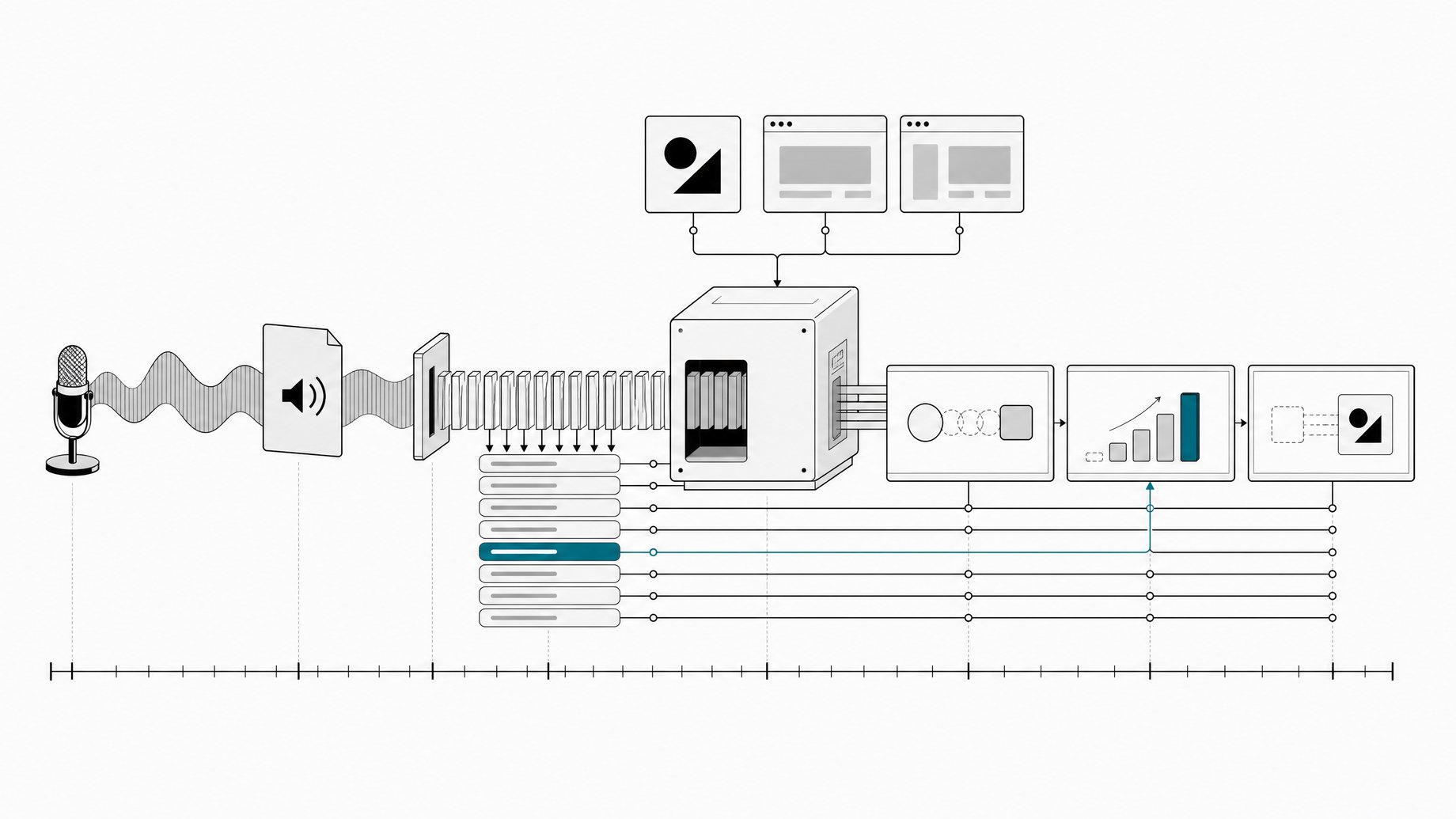
You give Claude Design a timestamped transcript of your narration plus a motion-focused prompt, and it builds animated graphics timed to what you say. The pipeline has four steps: record your camera and screen, export the audio as an MP3, turn that MP3 into an SRT transcript with an AI chat tool, then hand the SRT, your logos, and interface screenshots to Claude Design. Set thinking to a high level, let it build, and review the result against the narration.
TL;DR
- The workflow starts with a normal recording, then exports an MP3 so the audio can be transcribed separately from the video files.
- An SRT file supplies both the words and their timestamps, which is how the animations line up with the narration.
- The prompt asks for 16x9 graphics with more motion and less text, which keeps the output usable as video overlays.
- Attaching real logos and interface screenshots gives Claude Design actual visuals to work from instead of invented ones.
- The creator runs it at extra or max thinking, and says results are significantly better there than on medium.
- Expect a 30 minute to 2 hour build depending on video length, followed by a review pass with fix requests.
What does the pipeline look like from start to finish?
The workflow comes from a creator who publishes several videos a week and wanted high-quality animations without hand-building each one. Here is the sequence as described.
| Step | What happens | Tool |
|---|---|---|
| 1 | Record camera and screen | Camera and screen recorder |
| 2 | Recordings land in a synced folder shared with editors | Dropbox |
| 3 | Editors export an MP3 of the recording | Editing software |
| 4 | MP3 is uploaded and an SRT transcript is requested | ChatGPT (Claude or another AI also works) |
| 5 | SRT, animation prompt, logos, and screenshots go into Claude Design | Claude Design |
| 6 | Claude builds a video file | Claude Design |
| 7 | Team rewatches with narration and requests fixes | Claude Design |
Claude Design does the animation work. Dropbox and ChatGPT are supporting tools. The creator is explicit that ChatGPT is just what their team uses for transcription, and that Claude or any other AI could do the same job.
Why use an SRT file instead of a plain transcript?
A plain transcript tells the model what you said. An SRT also tells it when you said it. That timing is what lets an animation appear at the moment you mention a product, a number, or a concept.
An SRT is a simple text format. Each caption block has an index, a start and end time, and the spoken text:
12
00:01:04,200 --> 00:01:07,800
Then we open the dashboard and check usage.
Without those timecodes, you would get graphics that match the topic but drift out of sync with the voiceover. With them, Claude has a map of the whole video to build against.
Why export an MP3 first?
The editors export an MP3 of the recording rather than uploading the full camera and screen files. Audio is far smaller than video, so it uploads faster, and the transcription step only needs the speech. This is a practical choice, and the source doesn't give size limits for any tool. If your transcription tool accepts your video format directly, you may be able to skip this step.
What should the animation prompt ask for?
The creator's prompt, in essence, asks for 16x9 graphics with more motion and less text. The full prompt wasn't shown in the source, so treat that as the core brief rather than a template to copy word for word.
The reasoning behind those two constraints is easy to follow:
- 16x9 matches standard YouTube video frames, so the output drops into an edit without cropping.
- More motion pushes the model toward animated elements instead of static slides.
- Less text keeps the screen from competing with the narration. The viewer is already hearing the words.
If you write your own version, you would likely also want to say that the SRT is the timing source and that animations should appear when the related line is spoken. That is a sensible addition, not something the source confirms the creator does.
Which assets should you attach?
The creator attaches two kinds of files: logos and interface screenshots. The stated reason is that Claude then has the real visuals to work from.
This matters when your videos cover specific products. A model asked to animate "the settings panel" without a reference will invent something plausible and wrong. Given a screenshot, it can reproduce or highlight the actual interface. The same applies to logos, which are easy to get subtly incorrect when generated from memory.
Which model and thinking settings work best?
The creator says they use thinking set to extra or max for this workflow. Their default for other work is medium, but for animation they find the higher levels significantly better. The model name in the transcript is unclear, so check which models and thinking levels your own Claude Design account offers and pick the strongest option.
The tradeoff is time. Higher thinking settings take longer, and the creator reports builds running from 30 minutes to 2 hours depending on video length. That fits a batch process: start the job, work on something else, review when it finishes.
How does the review and revision step work?
When the build finishes, you get a video file. The team rewatches it together with the narration and asks Claude for any fixes. The source cuts off mid-sentence at this point, so the details of how fixes are requested aren't covered.
A reasonable way to run this pass, based on general practice rather than the source:
- Play the animation with the narration audio, not muted.
- Note the timestamp of each problem, such as a graphic that appears late or a screenshot that looks wrong.
- Send the fixes as a batch, referencing the SRT timestamps so the model knows exactly where to change things.
Is this workflow worth trying?
It makes sense if you publish often and your videos explain software, ideas, or processes that benefit from visual aids. The setup is light: an audio export, a transcript, a prompt, and a handful of brand assets. The costs are waiting time and the need to review output before it goes into a final edit.
It is less compelling if your videos are mostly talking-head with no screen content, or if you need frame-accurate control over every motion. The source doesn't cover pricing or usage limits for Claude Design, so check those before committing to a weekly schedule.
Frequently Asked Questions
Do I need ChatGPT to create the SRT file?
No. The creator's team uses ChatGPT, but they say Claude or any other AI would work. Any tool that can transcribe audio and output SRT-formatted timestamps will do.
How long does Claude Design take to generate the animations?
The creator reports roughly 30 minutes to 2 hours, depending on video length. That was with thinking set to extra or max, so lower settings may finish faster at the cost of quality.
What goes into the Claude Design request?
Four things: the SRT transcript with timestamps, an animations prompt asking for 16x9 graphics with more motion and less text, your logos, and screenshots of the interfaces you discuss. The model name and thinking level are set before you submit.
Why does the creator avoid medium thinking for this workflow?
They use medium as their default for other tasks, but say animation results at extra or max are significantly better. For this workflow they accept the longer build in exchange for higher quality output.
How we source, write, and correct our articles. Editorial standards